Angelica: A Thin-Lettered Script for Elegant Design
There's a specific moment in design when a project needs more than just text—it needs a whisper of elegance, a stroke of personality. You're crafting a wedding invitation, designing a logo for a boutique, or creating social media graphics for a lifestyle brand, and the standard sans serif just falls flat. This is where a thoughtfully chosen script font like Angelica enters the conversation. It’s not merely a typeface; it’s a design asset with a distinct voice, offering a blend of grace and modernity that can elevate your work from functional to memorable.
The Anatomy of Angelica: More Than Just a Pretty Script
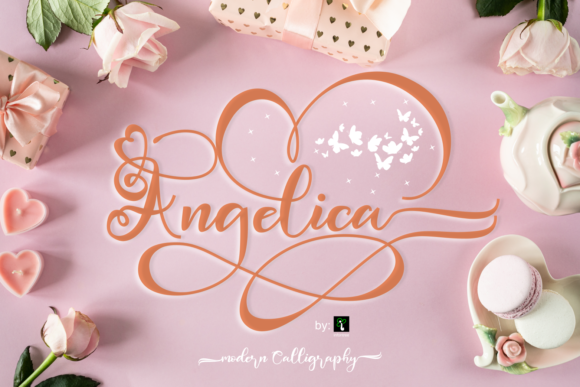
At first glance, Angelica presents itself as a thin lettered and graceful script font. Its defining characteristics are its delicate, flowing lines and a consistent, airy weight that avoids feeling heavy or overly ornate. This isn't a chaotic, heavily textured handwritten font; it's a modern typography solution that balances organic movement with careful construction. The letterforms connect with a natural, cursive rhythm, but the overall silhouette remains clean and legible. The personality of Angelica is one of refined sophistication—it feels personal and handcrafted, yet polished enough for professional applications. Its appeal lies in this duality: it can evoke romance and intimacy for a wedding suite, while simultaneously conveying contemporary chic for a brand's visual identity.
Strategic Applications: Where Angelica Truly Shines
Understanding a font's strengths is key to using it effectively. Angelica thrives in contexts where a touch of human elegance is desired. It’s a premium font that works exceptionally well as a display font, meaning it’s designed to capture attention in headlines, logos, and featured text rather than in long body paragraphs.
- Wedding & Event Stationery: This is Angelica's natural habitat. For wedding invitations, save-the-dates, menus, and program covers, its ravishing style sets a romantic and luxurious tone. The thin strokes ensure it doesn't overwhelm delicate paper stocks or intricate design layouts.
- Brand Identity & Logo Design: For businesses in the beauty, fashion, lifestyle, or artisanal food sectors, Angelica can form the core of a brand identity. A logo using Angelica suggests a brand that values craftsmanship, personal service, and aesthetic detail. It pairs beautifully with a clean serif font for body text or a geometric sans serif font for a more contemporary contrast.
- Editorial & Packaging Design: In editorial design, such as magazine feature titles or chapter headings, it adds a layer of sophistication. In packaging design for cosmetics, boutique foods, or luxury goods, it can communicate premium quality and care.
- Digital Presence: Angelica is a powerhouse for social media graphics. Use it for quote overlays, promotional announcements, or story highlights to create eye-catching, cohesive visuals. It's also effective for website hero text or email newsletter headers, provided it's used at a size where its thin strokes remain crisp and readable on screen.
Practical Guidance: Integrating Angelica into Your Workflow
Adopting a new creative font requires more than just downloading the file. Here’s how to approach Angelica with a designer’s mindset.
Evaluating Project Fit and Readability
First, assess if the font's personality aligns with your project's goals. Angelica’s graceful, thin style conveys elegance and femininity. It might not be the best fit for a tech startup's primary logo or a children's book cover, but it's perfect for a bridal boutique or a high-end café. Always test for readability. Because it’s a script font, it’s best used for short phrases, titles, or accents. Avoid setting entire paragraphs in Angelica; instead, use it to create a clear visual hierarchy, pairing it with a highly legible serif or sans serif for body copy. This contrast not only improves readability but also makes the design more dynamic.
Leveraging Its PUA Encoding
A significant practical advantage of Angelica is that it is PUA (Private Use Areas) encoded. In plain terms, this means all the stylistic alternates, swashes, and ornamental glyphs are easily accessible directly from your keyboard or character map, without needing specialized design software. This feature is a huge time-saver for designers and a game-changer for crafters using platforms like Cricut or Silhouette. You can effortlessly add decorative swashes to the beginning or end of words, substitute certain letters for more ornate versions, and create truly custom lettering with minimal effort. This level of access empowers you to fully explore the font's creative potential.
Font Pairing and Commercial Considerations
Successful font pairing is about balance. Let Angelica be the star. Pair it with a neutral, sturdy partner. A classic serif like Garamond or a modern sans serif like Montserrat creates a harmonious and professional look. For a more contemporary or edgy feel, try a bold, wide sans serif. When you download Angelica, review the included styles and license. Confirm that the license covers your intended use, whether for personal projects, client work in logo design, or commercial products like merchandise. A reputable commercial font will always provide clear licensing terms, giving you peace of mind as you incorporate it into your design assets library.
In the end, Angelica offers more than just beautiful letters. It provides a solution for designers and creators seeking to inject a specific mood—grace, elegance, and personalized charm—into their work. By understanding its character and applying it with strategic intent, you can use this script font to create designs that resonate deeply and stand out beautifully.